Case Study - Uncovering opportunity gaps in productivity app market
A comprehensive UX research study examining task management apps to identify unmet user needs and validate product opportunities through competitive analysis and usability testing.
- Client
- TaskFlow
- Year
- Service
- UX Research, Competitive Analysis, Usability Testing
Overview
The productivity app market is saturated with solutions, yet user satisfaction remains surprisingly low. TaskFlow emerged from a hypothesis: despite having dozens of task management options, users still struggle with fundamental problems like time estimation, cognitive overload, and meaningful work-life balance.
This research project aimed to validate market opportunities through systematic analysis of existing solutions and direct user feedback. Rather than building another feature-heavy productivity app, we sought to understand what users actually need versus what the market provides.
The study combined competitive analysis of market leaders (Todoist, Microsoft To Do, TickTick) with moderated usability testing to identify both explicit pain points and latent user needs. Our goal was to find the gaps where a new product could genuinely improve people's relationship with productivity tools.
Research Methodology
- Competitive Feature Analysis
- Heuristic Evaluation
- Moderated Usability Testing
- WSFJ Prioritization Framework
- User Need Identification
- Market Gap Analysis
- Feature Opportunity Mapping
- Behavioral Pattern Recognition
Competitive Analysis: Feature Saturation Problem
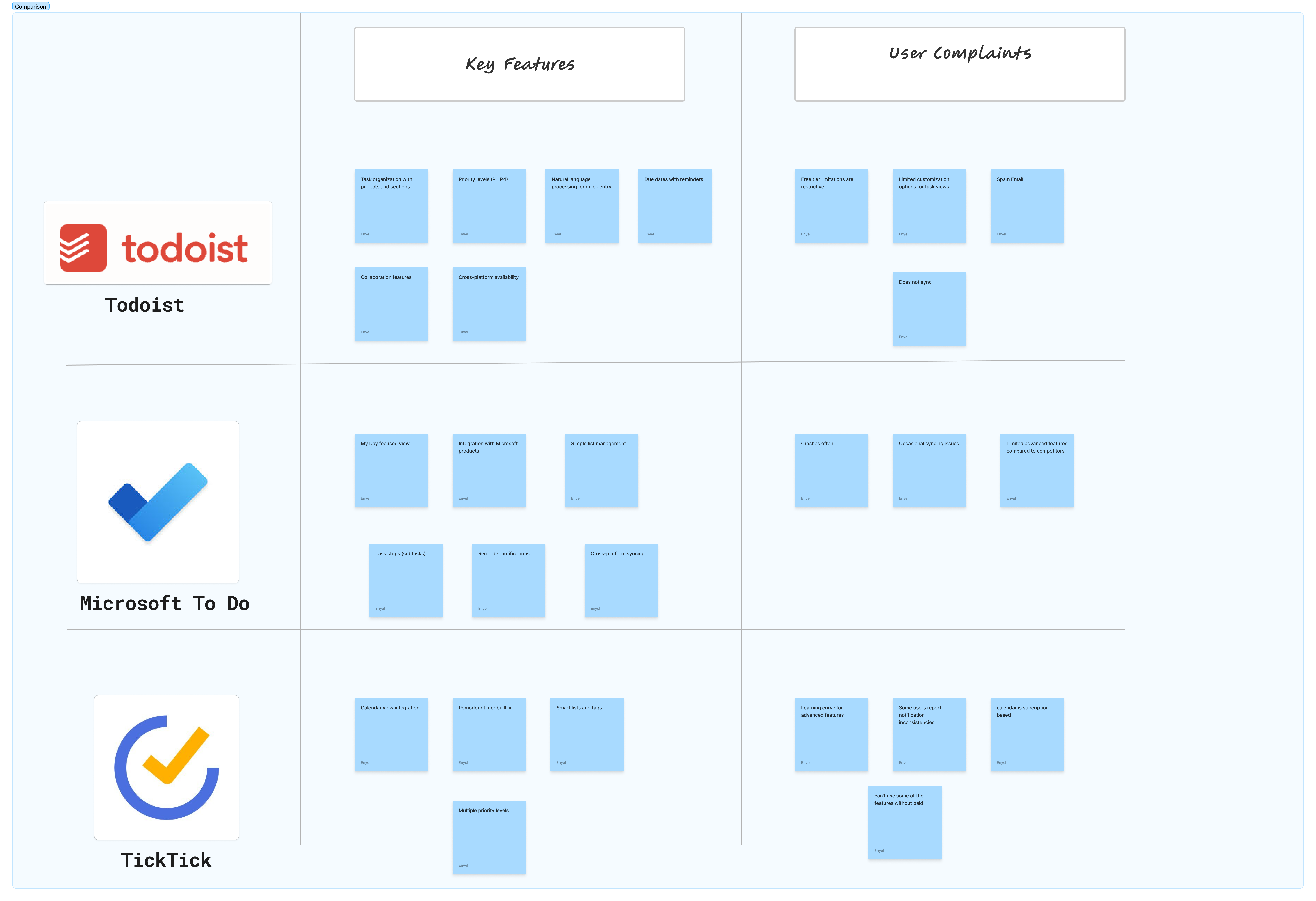
Our systematic analysis of Todoist, Microsoft To Do, and TickTick revealed a troubling pattern: feature accumulation without meaningful differentiation. Each app competed on quantity rather than quality of solutions, leading to overwhelming interfaces that hindered rather than helped productivity.
Todoist offered robust project management but suffered from complexity that intimidated casual users. Microsoft To Do provided excellent Microsoft ecosystem integration but lacked sophisticated planning tools. TickTick included time tracking features but buried them in confusing navigation hierarchies.
The key insight: all three apps focused on task capture and organization, but none addressed the fundamental challenge of realistic time and effort estimation. Users consistently struggled to plan their days because they had no tools to gauge how long tasks would actually take.
Unmet User Needs: Beyond Task Lists
Through user interviews and behavioral observation, we identified three critical unmet needs that existing solutions ignore: realistic effort estimation for better planning, simplified interfaces that reduce cognitive load, and meaningful work-life balance rather than pure productivity optimization.
Users wanted to estimate not just time but energy required for different tasks. A 30-minute creative project demands different mental resources than 30 minutes of email processing, yet no app acknowledged this reality. Participants consistently mentioned feeling overwhelmed by task lists that looked manageable but proved exhausting in practice.
The research revealed users abandoning productivity apps not because they lacked features, but because the apps failed to help them make realistic commitments to themselves and others.
WSFJ Framework: Prioritizing Opportunities
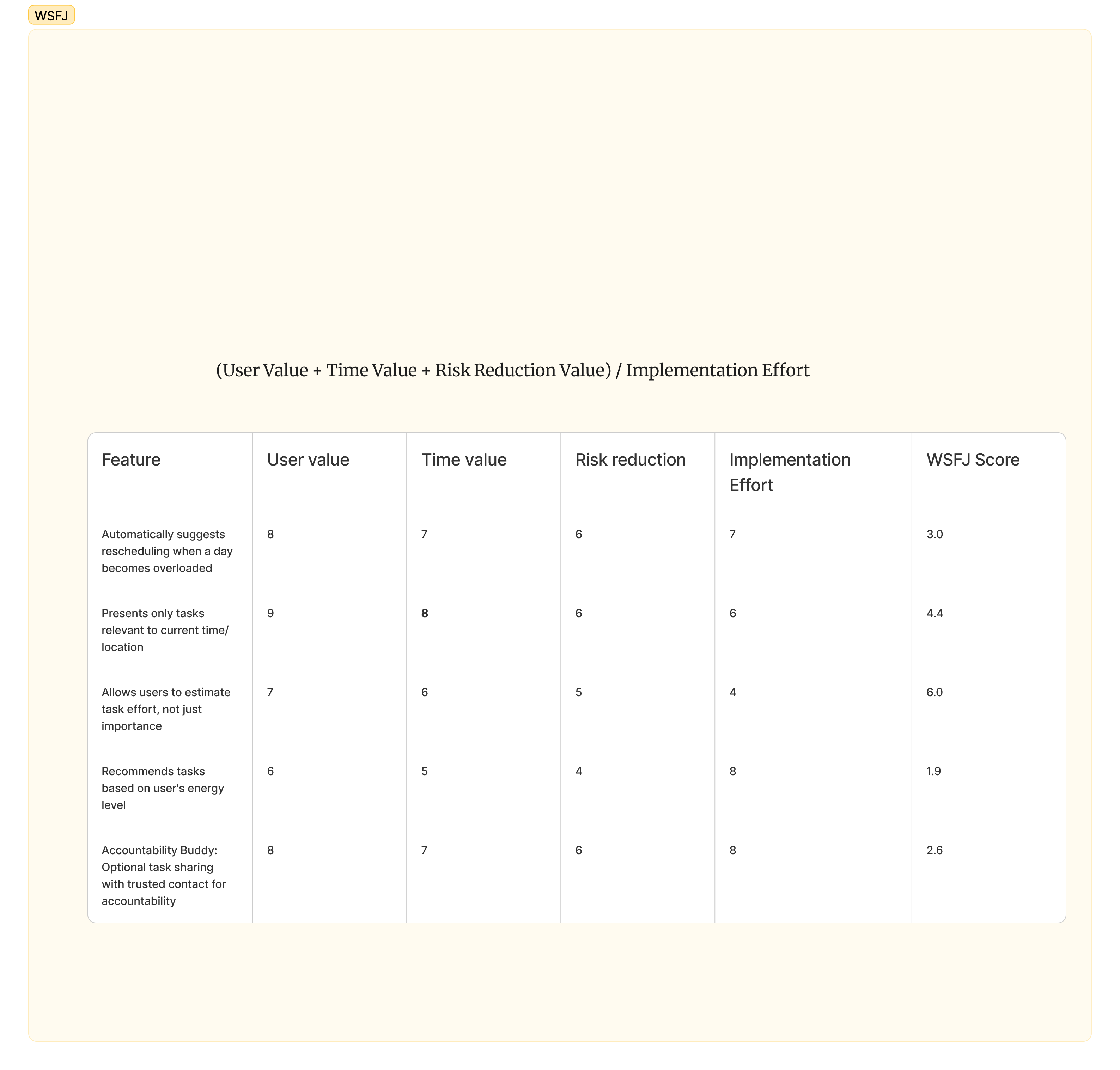
We applied the WSFJ (Won't/Should/Features/Jobs) framework to systematically evaluate potential features against user value, implementation complexity, and market differentiation potential. This analysis helped identify which opportunities offered the best combination of user impact and feasible development.
The standout opportunity was effort estimation—a feature with high user value, moderate implementation complexity, and strong differentiation potential. Users consistently rated this need highly while existing apps provided no meaningful solutions.
Other high-priority opportunities included simplified task entry, intelligent load balancing suggestions, and preview capabilities that showed the impact of scheduling changes before committing to them.
User Testing Insights: Real Behavior vs. Assumptions
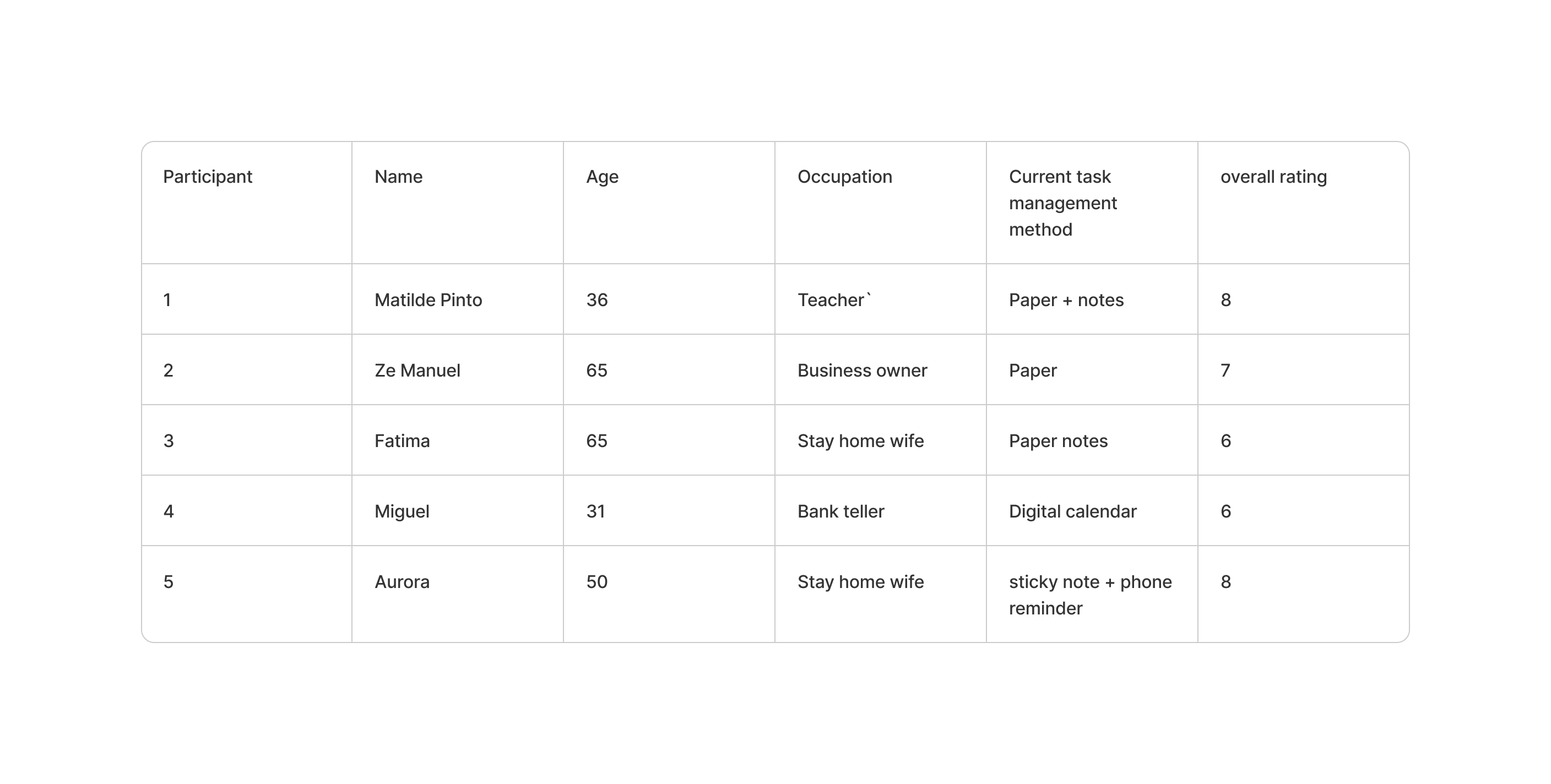
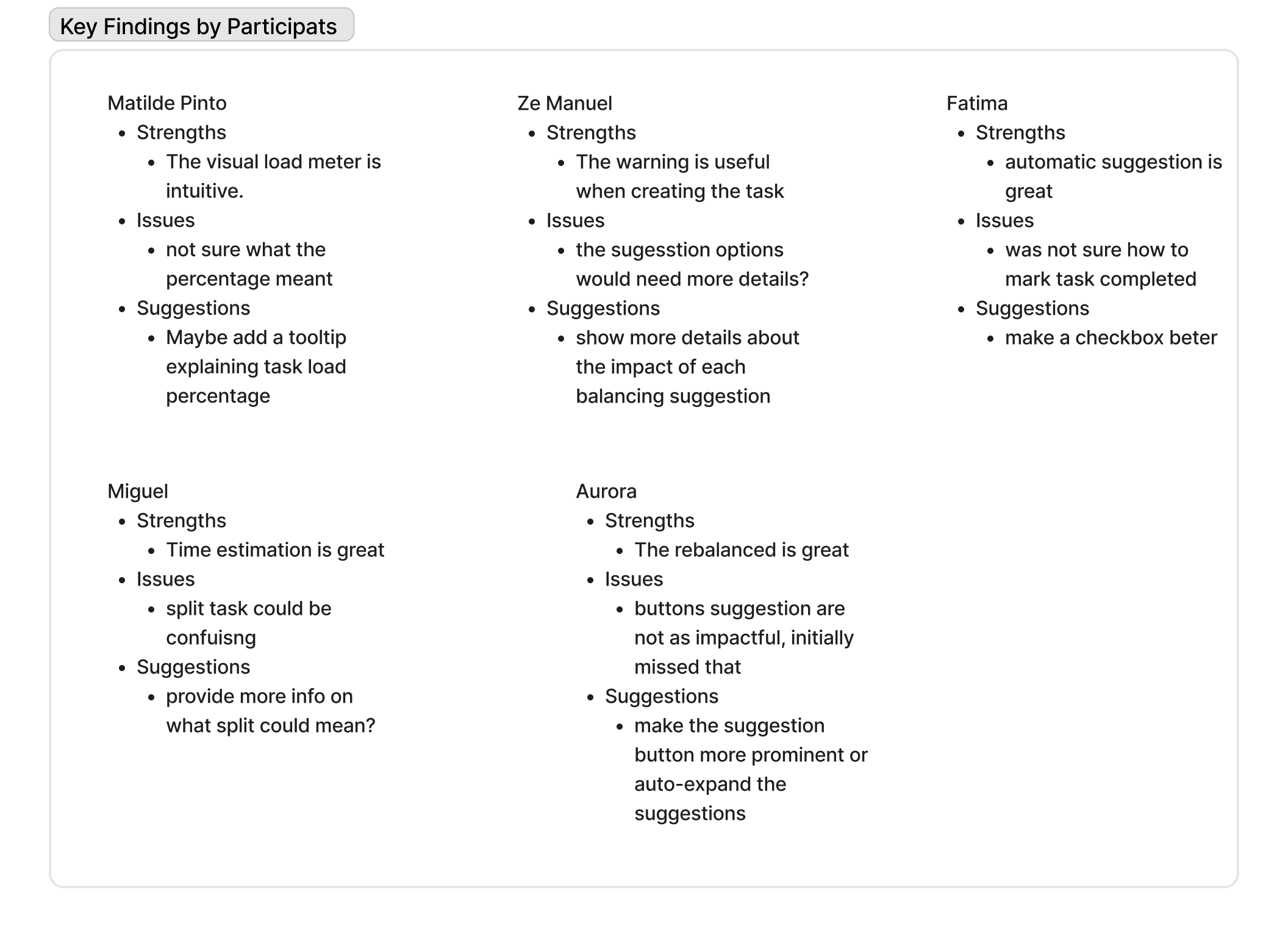
Moderated usability testing with 5 participants (Matilde, Ze Manuel, Fatima, Miguel, and Aurora) revealed significant gaps between how productivity apps expect users to behave and how they actually work. The testing focused on task creation, planning, and completion workflows across different apps.
Matilde appreciated visual feedback like load meters but struggled with unclear percentage meanings, suggesting need for better contextual information. Ze Manuel found warning systems helpful during task creation but wanted more detailed impact explanations for scheduling suggestions.
Fatima loved automatic suggestions but couldn't figure out how to mark tasks complete, highlighting discoverability issues. Miguel appreciated time estimation features but found task splitting confusing without clear explanations. Aurora valued rebalancing suggestions but initially missed them due to poor visual prominence.
Usability Pain Points: Consistent Patterns
The usability testing revealed consistent patterns across participants and platforms. Information hierarchy problems appeared in every app—users wanted tooltips, better explanations, and clearer visual feedback about their current task load and capacity.
Navigation issues emerged as a major frustration, with 2 out of 5 participants specifically requesting easier ways to return to main screens at any time. The complexity of features often obscured basic functionality, creating cognitive overhead that defeated the purpose of productivity optimization.
Visual feedback received mixed responses—participants desired more animations and visual interest but wanted them to communicate meaningful information rather than just aesthetic appeal.
Key Discovery: The Effort Estimation Gap
The most significant finding was universal user frustration with time-based planning that ignored effort and energy requirements. Every participant mentioned struggling to plan realistic schedules because they had no way to account for the mental load different tasks required.
This insight led to our recommended unique feature: effort estimation tools that help users plan not just when they'll do tasks, but whether they have the mental capacity to do them well. The feature would use simple scales (low, medium, high effort) combined with daily energy tracking to suggest optimal task scheduling.
Implementation would be straightforward—no complex AI needed, just smart defaults and user learning over time. The potential impact was significant: helping users make more realistic commitments and reduce the stress of over-scheduling.
Research Synthesis and Recommendations
The research validated clear market opportunities in an apparently saturated space. While existing apps compete on features, users need better fundamentals: realistic planning tools, simplified interfaces, and respect for human energy limitations rather than pure time optimization.
Our primary recommendation was developing effort estimation as a core differentiator, implemented through simple user inputs and intelligent suggestions rather than complex automation. Secondary opportunities included streamlined onboarding, better information hierarchy, and preview capabilities for scheduling changes.
The business case was compelling: rather than competing in the crowded full-featured productivity space, a focused solution addressing effort estimation could capture users frustrated with existing options while avoiding direct feature-to-feature competition.
Methodology Validation and Limitations
The WSFJ framework proved valuable for systematically evaluating opportunities, though it required adaptation to balance user needs against technical feasibility. Competitive analysis effectively identified feature gaps, but user testing was crucial for understanding why gaps existed.
Research limitations included small sample size (5 participants) and focus on power users who might not represent broader market needs. Geographic and demographic diversity could have provided additional insights into different productivity challenges and cultural approaches to task management.
Future research should include larger sample sizes, broader demographic representation, and longitudinal studies tracking how users' productivity needs evolve over time.
research showed that productivity tools should optimize for human capacity and realistic planning rather than pure efficiency, opening opportunities for more thoughtful and sustainable approaches to personal productivity software.